Reverb
Reverb effects are used in almost all music productions and for a variety of purposes. In everyday life, reverberation is the result of the many reflections of sound that occur in a given room or other space. In an ambient space, sound may travel directly to your ear and also be reflected many times off the walls and ceiling of a room before again reaching your ear. With each reflection, the sound is attenuated as sound energy is absorbed by the reflecting surfaces and dissipated by traveling through a medium (usually air). This collection of reflected and attenuated sounds is what we know as reverb.
Reverb provides essential aural cues about the nature of any given space. As such, reverb is commonly used in music production to create virtual spaces in which the various parts of a mix can interact.
Fender Studio Pro features three built-in reverbs: Mixverb, Room Reverb, and OpenAIR. The following describes these reverb effects.
Mixverb™
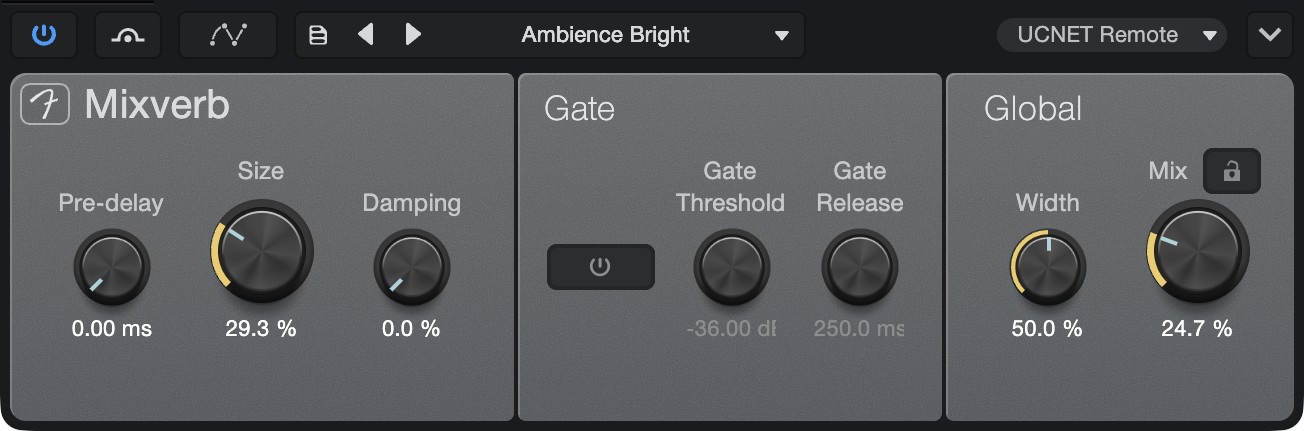
Mixverb is a simple and efficient reverb that is meant to be used as an Insert on mono or stereo Tracks. Mixverb features adjustable size, pre-delay, and damping, as well as an adjustable gate and stereo width control.
Mixverb offers the following parameters:
- Pre-delay: Adjust the predelay time. Variable from 0 ms to 500 ms. Predelay is the amount of time before the first reverberated signals are heard.
- Size: Adjusts the relative size of the reverberating space. Variable from 0 to 100%.
- Damping: Adjusts the relative amount of damping (attenuation of the upper frequencies) of the reverberated signal. Variable from 0 to 100%.
- Gate: The gate is applied to the reverb output signal.
- Gate Tail: Click to engage/disengage the gate.
- Gate Threshold: Adjusts the threshold of the gate. Variable from -36 dB to 12 dB.
- Gate Release: Adjusts the release time of the gate. Variable from 10 ms to 250 ms.
- Global:
- Width: Adjusts the width of the stereo field. Variable from 0 to 100%. Only for stereo Tracks.
- Mix: Adjusts the mix of processed signal with the original dry signal. Variable from 0 to 100%.
- Lock Mix Level: Locks the Mix control in place.
Open AIR2
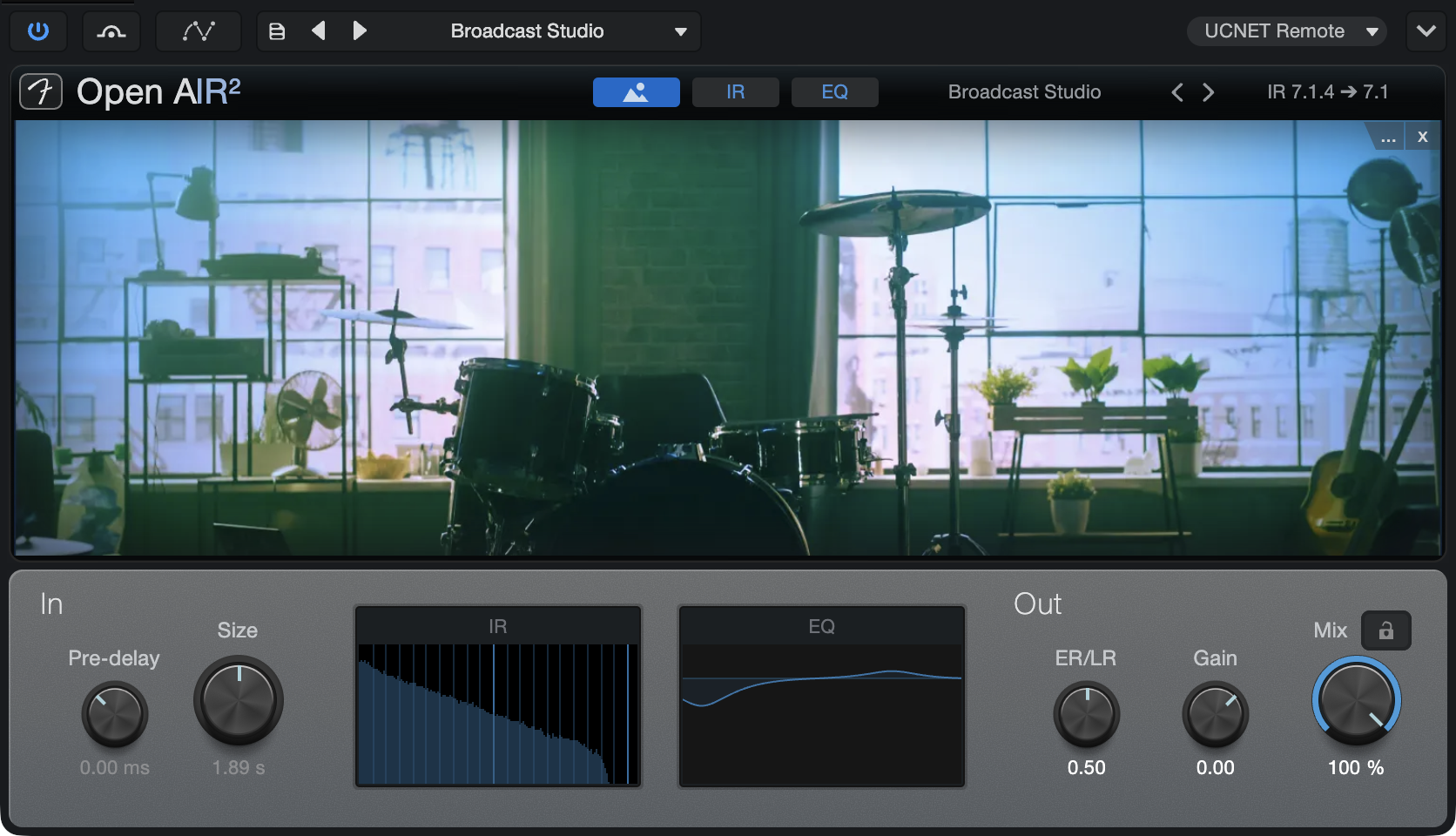
Open AIR2 is a highly efficient convolution reverb plug-in capable of delivering ultra-realistic reverberation based on impulses captured from both real spaces and classic hardware reverbs. Open AIR2 includes a 4-band EQ and supports mono, stereo, or multichannel impulse responses.
Open AIR2 provides three views with multiple parameters. These views are Image, IR, and EQ, and each view can be selected by clicking the navigation icons at the top of Open AIR2 or the IR and EQ icons at the bottom, within the Global section.
Global Controls
- Impulse Name: Click on the Impulse Name field to load your own impulse response
- Prev/Next: Switches the impulse response to the previous or next file in the same file location as the existing impulse response.]
- Channel Configuration: Displays the channel format of the currently loaded impulse response.
- Pre-delay: Defaults to 0 ms; adds pre-delay to the impulse response with a positive value, or truncates existing pre-delay in the impulse response with a negative value. Values range from -150 to 300 ms.
- Size: For values smaller than the original impulse response length, this cuts the end (that is, shortens the reverb). For larger values, the range between the ER/LR (early reflections/late reflections) crossover point and the impulse response end gets time-stretched. The beginning (up to the ER/LR crossover point) is not stretched, so the room impression created by the early reflections stays intact. [Ctrl]/[Cmd]-click restores the length to the impulse response length.
- View Selectors: Choose IR or EQ View.
- ER/LR: Scales volumes before and after the ER/LR crossover point, from 0 to 1.00.
- Gain: Sets the overall output volume.
- Mix: This is the wet/dry mix, from 0 to 100%.
IR View
This view contains a visualization of the loaded Impulse Response and Envelope and Processing controls.
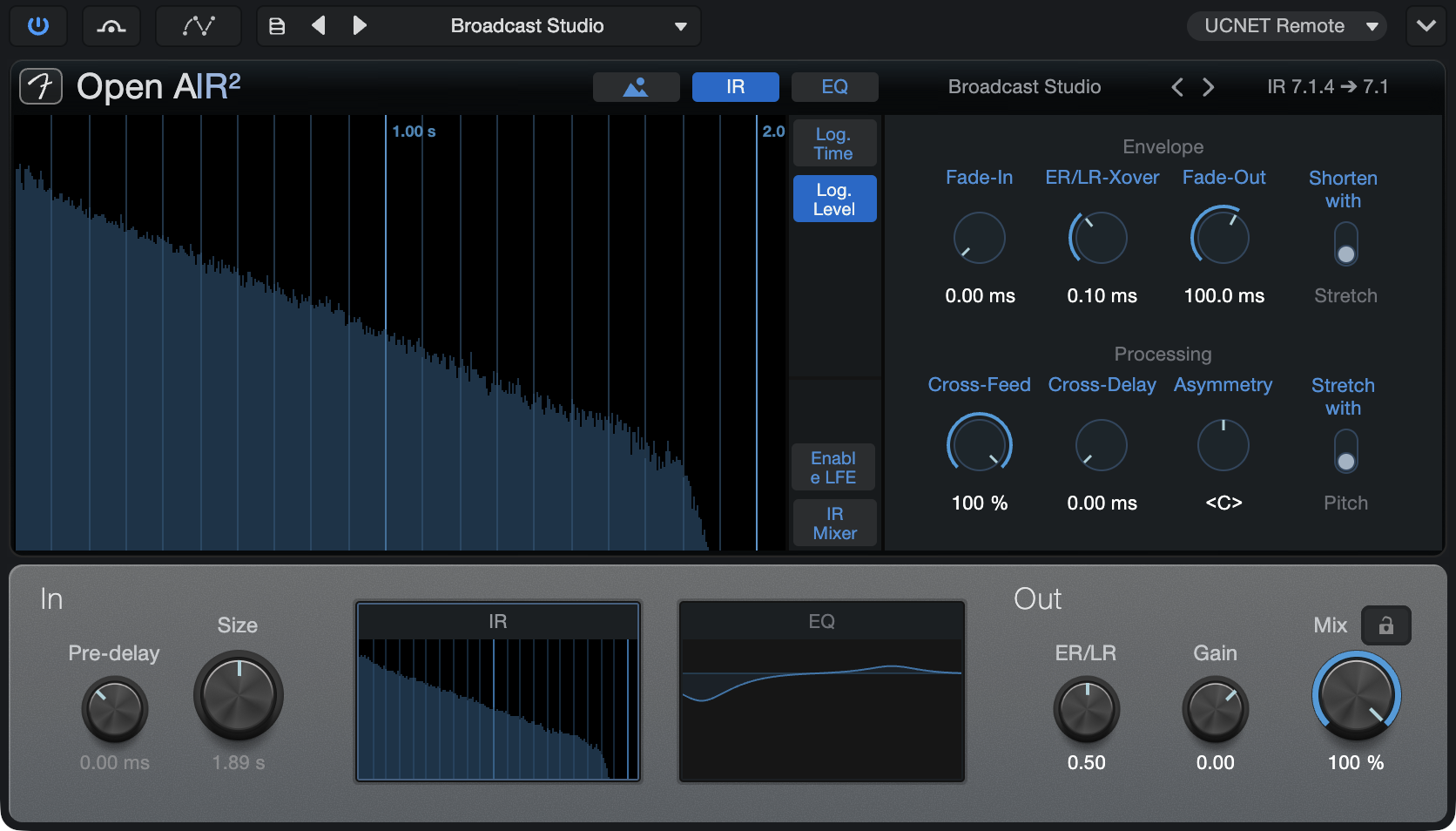
- IR Display and Selection:
- Log Time: When engaged, this shows more details for the early reflections, making it easier to set ER/LR crossover point.
- Log Level: When engaged, this makes it easier to see RMS curves.
- Enable LFE: When engaged, Open AIR2 will process content in the LFE channel. Available only in Sessions with an LFE channel.
- IR Mixer: Click to open a mixer with a level slider and mute button for each channel. Available only in multichannel Sessions.
- Envelope:
- Fade-In: Fades in the impulse response, from 0 ms to 2.0 s.
- ER/LR Crossover: Sets the crossover point in time for early and late reflections; affects the impulse response processing. Range is from 0 to 500 ms.
- Fade-Out: Fades out the impulse response, from 1 ms to the length of the impulse response.
- Shorten with Stretch: When this is activated, and the length is smaller than the original impulse response, the impulse response is not cut and is instead timestretched between the ER/LR breakpoint and impulse response end. The content of the impulse response before the ER/LR breakpoint is not stretched or compressed, preserving the character of those reflections and thus a large part of the reverb character.
- Processing: As Open AIR2 does not feature true stereo processing, channel cross-feed and cross-delay is built-in.
- Cross-Feed: Adjusts the amount of the delayed “other” channel that gets fed into the left and right IR channels, from 0 to 100%
- Cross-Delay: Adjusts the delay of the cross-fed channels, effectively acting as stereo distance, from 0 to 25 ms.
- Asymmetry: Adjusts delays and the mix of cross-feed to simulate an asymmetric recording setup, from full left to full right.
- Stretch with Pitch: When this is activated, time-stretching is not used for length changes, and re-sampling is used instead. This scales the early reflections as well.
EQ View
EQ View contains a four-band EQ to shape the sound of the impulse response.
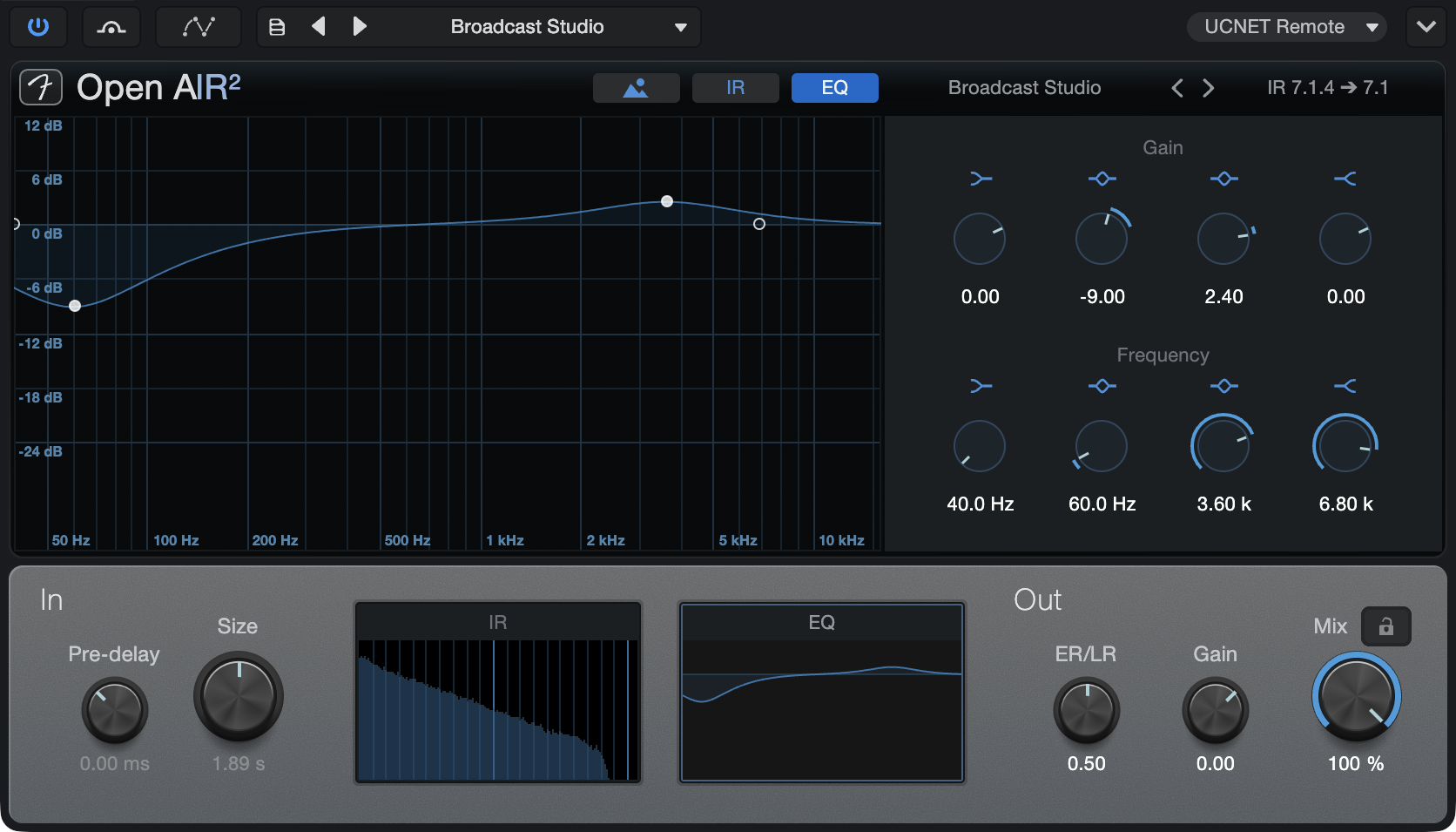
- Gain controls Low Shelf, Low Mid, High Mid, and High Shelf boost/cut controls from -36 to +12 dB.
- Frequency controls Low Shelf, Low Mid, High Mid, and High Shelf frequency controls
You can also click and drag any of the nodes in the EQ display to adjust Gain and Frequency simultaneously for any band.
Image View
Image View allows you to store a photo for easy reference of your impulse response source.
Click the [...] menu to select an image to import, or drag and drop one from your OS’ file browser. To see your photo full-size, just click the photo. Click the “x” button in the top-right corner of the display to remove the current photo.
Images are saved and recalled with OpenAIR Presets.
Room Reverb
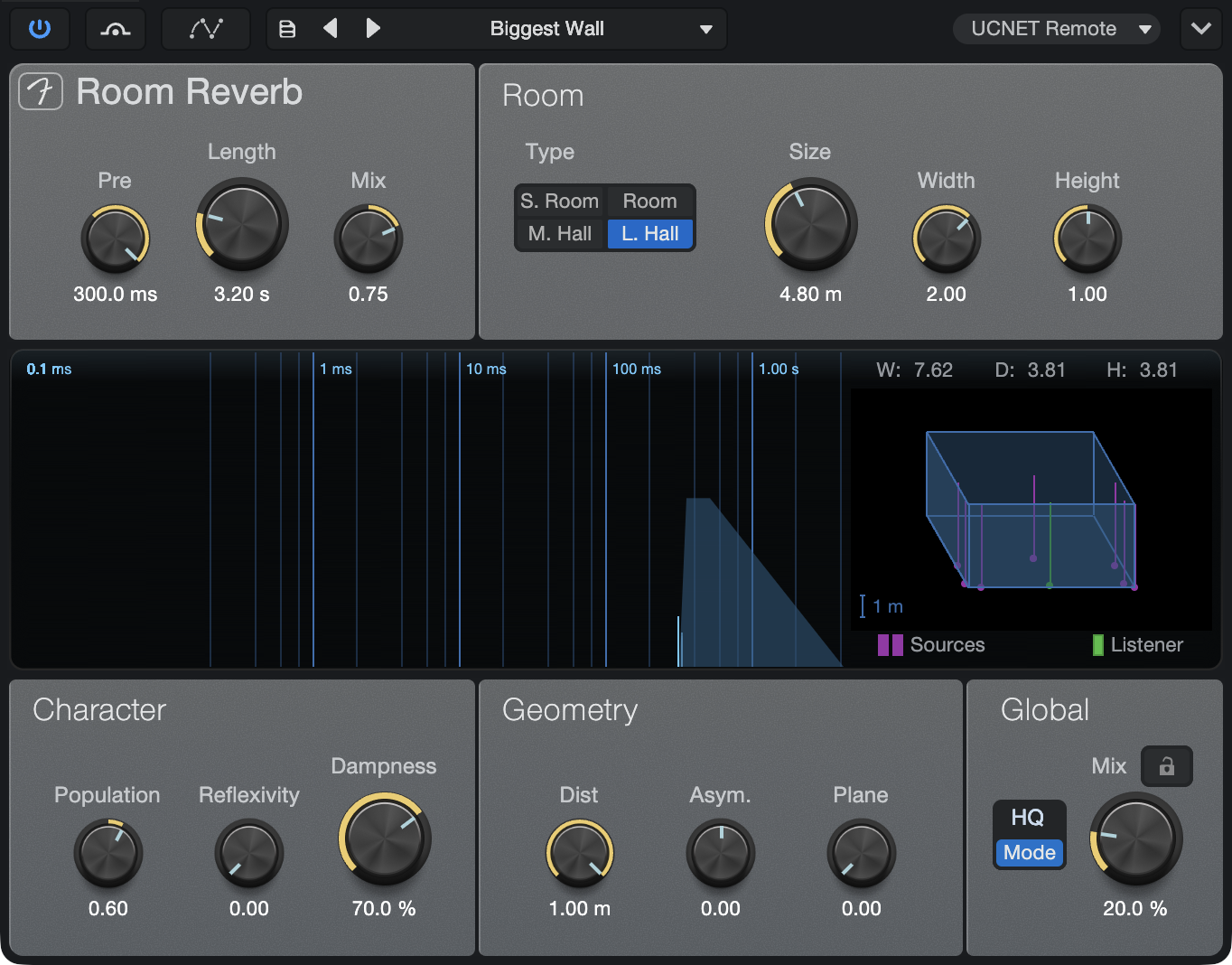
Room Reverb is a room simulator reverb that adjusts its internal reverb parameters based on virtual-room models. It is meant for use as a send effect or as a Main Output Channel effect. Room Reverb features variable room parameters and geometry, selectable room models, and population, damping, and surface-smoothness controls.
Room Reverb provides the following parameters:
- Pre: Adjusts the offset for room-derived natural predelay amount. Variable from 0 ms to a higher value determined by current Room settings.
- Length: Adjusts the offset for room-derived natural reverb tail length. Value range is variable based on current Room settings.
- Reverb Mix: Adjust the mix of the reverb tail and early reflections. Variable from 0 to 1. Reverb display is updated to indicate this mix.
- Room:
- Type: Select one of four Room Type models: Small Room, Room, Medium Hall, or Large Hall.
- Size: Adjusts the geometric average of the width, depth, and height of the virtual-room model. Variable from 1 m to 20 m.
- Width: Adjusts the width relative to size. Variable from 0.1 to 2.
- Height: Adjusts the height relative to size. Variable from 0.1 to 1.
- Display: Displays the overall reverb characteristics across a self-adjusting time scale. Early reflections are represented by vertical lines, and the reverb tail is represented by a colored envelope.
- Character:
- Population: Adjusts the relative population of people in the virtual room. Variable from 0 to 1.
- Value of 0 results in enhanced bass, “static” tail.
- Value of 1 results in attenuated bass, “moving” tail.
- Reflexivity: Adjusts the relative smoothness of the surfaces of the virtual room. Variable from 0 to 1. Higher values evoke a more echo-like reverb tail.
- Dampness: Adjusts the relative humidity of the air in the room. This has the effect of attenuating the upper frequencies of the reverberated signal. Variable from 0 to 1.
- Population: Adjusts the relative population of people in the virtual room. Variable from 0 to 1.
- Geometry:
- Dist: Adjusts the relative distance between the source and the listener position within the virtual room. Variable from 0.1 to 1.
- Asym.: Adjusts the left and right asymmetry between the source and the listener position. Variable from -1 (listener position far right) to 1 (listener position far left).
- Plane: Adjusts the relative height of the stereo source and listener position within the virtual room. Variable from 0 (half the height of the room) to 1 (ceiling).
- Room Model: Select a synthetic reverb model: Small Room, Room, Medium Hall, and Large Hall.
- W, D, H Display: Displays approximate room dimensions based on current Room settings.
- Global:
- Eco/HQ Mode: HQ mode (High Quality) is selected by default. Engage Eco (economy performance mode) to use fewer CPU resources by disabling floor and ceiling reflections and reducing the calculation accuracy for the reverberation. Eco Mode is available for all speaker setups, ranging from mono to stereo (up to 9.1.6 spatial audio). While Eco Mode improves CPU performance, keep in mind this benefit comes with the cost of a lower grade of detail.
- Mix: Adjusts the mix of the Room Reverb signal with the original dry signal. Variable from 0 to 100%.
- Lock Mix Level: Locks the Mix control in place.
Studio Verb
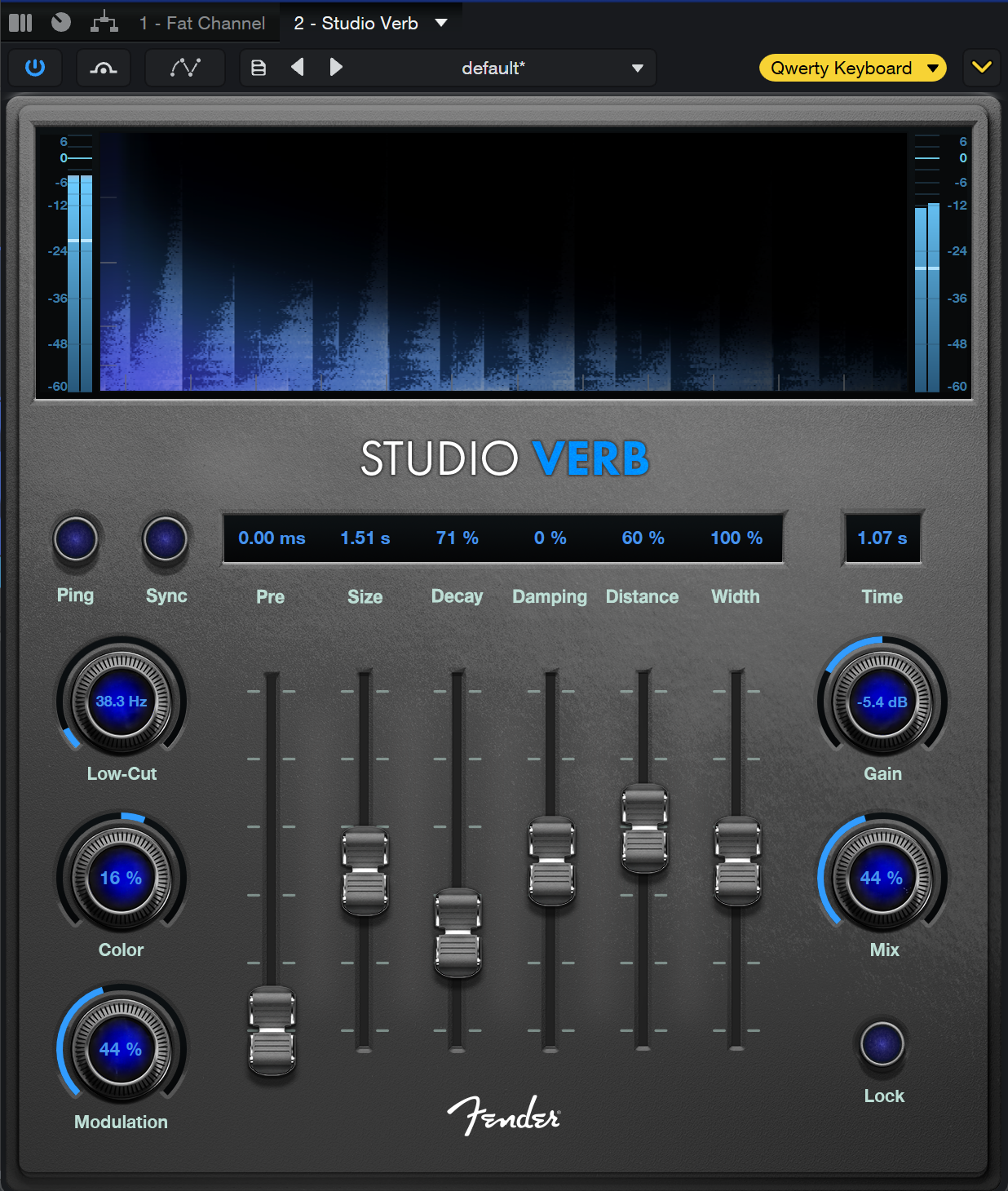
Studio Verb is an algorithmic reverb effect covering a wide range of sounds and applications, from small drum rooms to massive and lush artificial spaces. While the large display provides visual feedback on the current effects settings, the “Ping” button opens up new possibilities for shaping reverbs. Studio Verb also provides additional controls for center and sub level when used in a multichannel surround signal path.
-
Ping: Pushing this button sends a short burst of noise into the reverb, triggering the full frequency spectrum of the effect signal, allowing you to shape your reverb sound intuitively with better audible feedback than any other instrument could provide.
-
Sync: When enabled, Pre Delay values are synced with the tempo of your Session and can be adjusted by musical steps with the Pre fader.
-
Low-Cut: Reduces muddy or unwanted low-frequencies from the input signal. Controlling these frequencies can be especially helpful when applying reverb to low-end instruments like bass or drums. Variable from 5.00 Hz to 500 Hz.
-
Color: Adjusts the overall tonality of the reverb. Adjusting the Color knob from 1% to 100% will add higher frequencies to the reverb tail, making the source sound brighter. Adjusting the Color knob from -1% to -100% will give the source a deeper, “warmer” sound.
-
Modulation: This parameter introduces slow, slight variations of the delay time to the reverb. These micro-variations reduce standing waves and tonal coloration that can occur in static reverbs and prevent regular patterns from forming. At higher settings, the increased temporal instability results in a more diffuse sound and leads to creative chaos. Variable from 0 to 100%.
-
Pre: Adjusts the predelay time. Variable from 0 ms to 2s. Predelay is the amount of time before the first reverberated signals are heard.
-
Size: Adjusts the relative size of the reverberating space. Variable from 100ms up to 60s.
-
Decay: Adjusts the time it takes for the reverberated sound to fade out (or “decay”). Variable from 50% to 200%.
-
Damping: Adjusts the relative amount of damping (attenuation of the upper frequencies) of the reverberated signal. Variable from -100% to 100%.
-
Distance: Adjusts the relative distance between the source and the listener position within the virtual room. Variable from 0 to 100%.
-
Width: Adjusts the width of the stereo field. Variable from 0 to 200%.
-
Time: Displays the current reverb tail-length. Adjusting the Size and Decay parameters will change the length of time displayed.
-
Gain: Sets the overall output volume.
-
Mix: Adjusts the mix of processed signal with the original dry signal. Variable from 0 to 100%.
-
Lock: Locks the Mix control in place.