Vocal Tune
Vocal Tune delivers real-time pitch correction built specifically for vocals. It offers a versatile sonic range — from natural, transparent pitch correction to the iconic, heavily processed sounds popularized by artists like Cher and T-Pain — with formant shifting included for an even broader palette of creative effects.
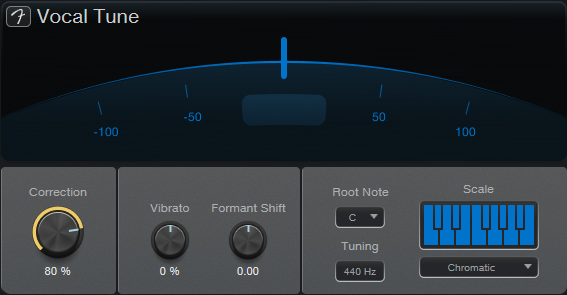
Vocal Tune is intuitive and approachable, featuring support for both preset and custom scales alongside a curated library of ready-to-use presets. With a native latency of under 12ms, it performs reliably on live signals as well. Insert it on an input channel for processed recording or assign it to a Real Instrument Player on the Show Page for seamless live performance use.
The Arch located at the top center of the Vocal Tune plug-in displays the tuning of the output sound’s pitch (-100 to 100 cents). Below this, a center-note indicator appears whenever you start singing. The indicator displays a beam to either side. When the left beam is displayed, the signal is tuned below the closest note (flat); when the right beam is displayed, the signal is tuned above the closest note (sharp). When neither side displays a beam, the signal is perfectly tuned.
The following parameters are available for Vocal Tune:
-
Correction: Much like a global mix knob, this parameter determines how much tuning correction you would like to add to your vocals: At lower values, only subtle correction is applied, leaving the performance closer to its original pitch. At maximum, the pitch is fully snapped to the target note. If you're looking for that iconic, tuned sound, simply make sure to have the right root note selected in addition to setting Correction to 100% and Vibrato to -100%
-
Vibrato: Use this parameter to control how much of the original vibrato and natural pitch fluctuation is preserved after correction. A value of 0 % (default) preserves the natural vibrato, while lower values will make the signal sound more artificial and flat, and higher values exaggerate the original vibrato beyond its natural amount.
-
Formant Shift: This parameter alters the resonant frequencies (formants) of your voice without changing its pitch. Turning the knob counterclockwise will alter the frequencies so that your voice sounds deeper. Turning the knob clockwise will alter the frequencies so that your voice sounds bright and thin.
-
Root Note: Choosing a root note defines the tonic or foundation of the musical key. Together with the scale parameter, this tells the plugin which notes are valid, ensuring your voice is locked in with in-key frequencies.
-
Tuning: If there is a specific frequency you would like to tune your vocals to, click and type the frequency in. You can calibrate the Tuner to a center frequency between 415 Hz to 465 Hz. 440 Hz is the default frequency.
-
Scale: Use the Scale parameters to define the scale you would like your vocal performance to conform to. The keyboard is useful for users who would like to select notes that aren’t included in any of the preset scales (thus creating a custom preset). Underneath the keyboard, you can choose from a list of 15 commonly used scale presets.