Stem Separation
Fender Studio Pro’s Stem Separation is an extension capable of separating any stereo or mono track into four separate stem tracks, isolating vocals, guitar, piano, bass, drums, and “other” (other instrumentation).
Stem separation can be triggered by using the shortcut Cmd/Ctrl+U or right clicking onto the chosen event. From its context menu, select the “Separate Stems” option (located: Audio/Audio Processing/Separate Stems):
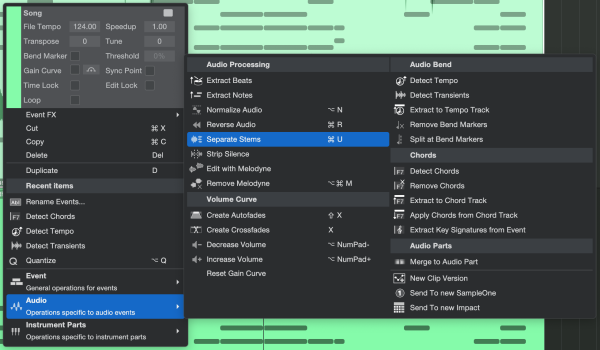
In order to use this feature an additional extension needs to be installed.
Triggering Stem Separation opens a dialog where you can edit the settings before initiating the process:
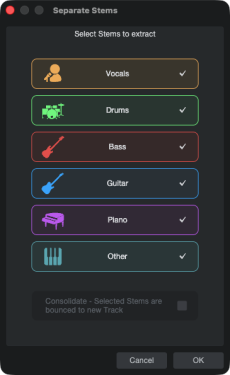
The dialog allows you to select the stems you’d like to separate. The option “Consolidate” allows you to merge the selected stems into a new track. The consolidate option could prove helpful if you would like to remove certain stems, but maintain everything else as a single Event.
Note: The last used settings in the dialog are stored for the next time.
After making your selection and clicking “okay,” a progress window will appear. Depending on the length of the source material, the process of track analysis and stem separation may take a few minutes.
The generated tracks are named automatically by using the name of the source event and appending the stem type. They are all placed in a new folder track underneath the track of the original event:
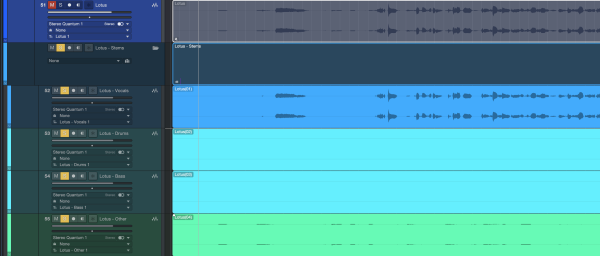
After the process is complete, the original track will be muted.