Export to Zip
From the File menu, you’re able to export Fender Studio Pro documents—Sessions, Shows, and Mastering Projects—with all of their referenced media files to a Zip file for easy backup and sharing. In addition, all unused files are removed from the exported Zip to keep it as small as possible. You can access this via either the “Save as” or “Convert to” options.
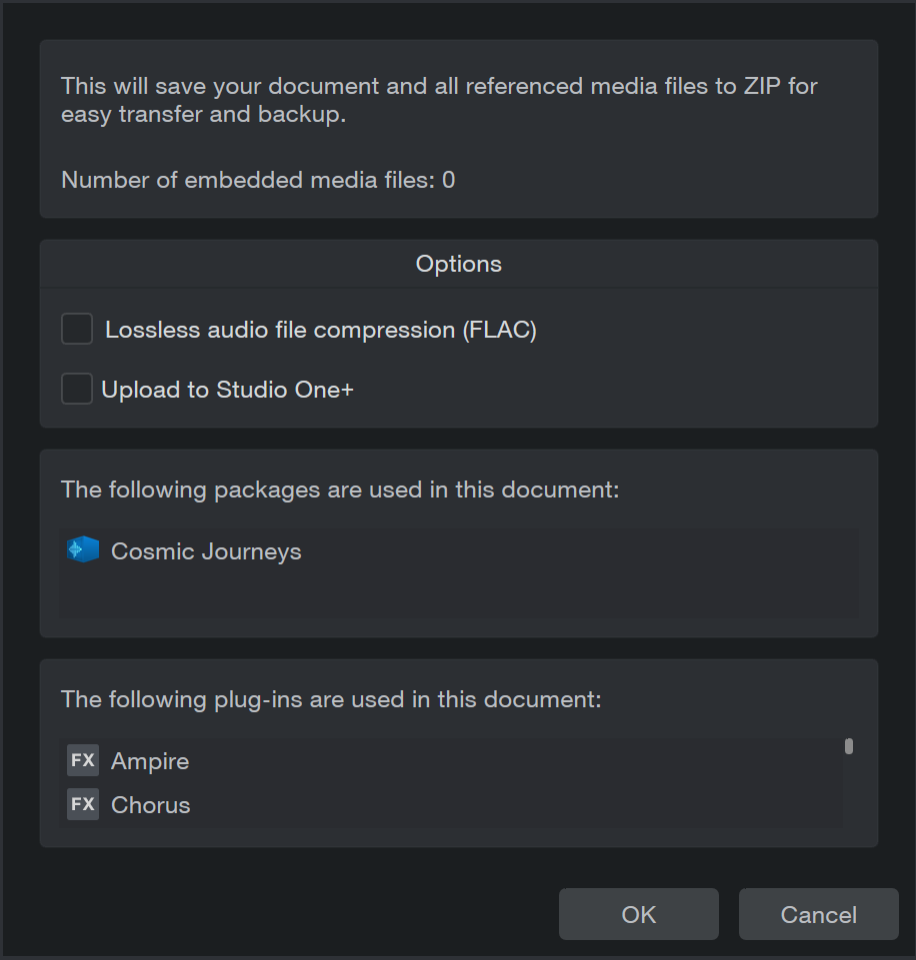
When doing so, you’ll be presented with this dialog box:
Options:
-
Lossless audio file compression (FLAC): When ticked, the audio files in the exported Zip will be converted to .flac. This does not apply to audio files used in an instrument like Sample One)
-
Upload to Fender Studio Pro+: When ticked, your new Zip file will be uploaded to your Fender Studio Pro+ account, if you have one. You’ll be prompted with a dialog box showing your list of available Workspace locations for upload. Your new Zip file will still be available and saved locally.
You’ll also receive a list of packages (Sound Sets, etc.) and plug-ins that are used in the document. Note that these packages and plug-ins are commercial and copyrighted and will not be included in your Zip for copyright reasons. This is useful information in the event that you want to share a Session with a collaborator who does not own the same plug-ins that you do.
The Zip file created will only contain files referenced by the document. Files in the Pool will only be added if they are used in Zipped Session. Additionally, alternate Versions of Sessions will not be included in the Zip.
Opening Zip Files
Zip files created with Fender Studio Pro’s Zip exporter can also be opened using File/Open. These documents will then be imported to your Sessions/Shows/Projects folder before the Session, Show, or Mastering Project is opened.
Alternatively, if the Zip file had been uploaded to Fender Studio Pro+ , these Zip files will be shown in the Browser—and can be downloaded and unpacked with simple drag and drop.